Posts

The Benefits and Information of USB Type C

Image
USB stands for Universal Serial Bus. And a USB cable is used mainly for power transfer. There are a lot more things that it can do despite this.  And when we are talking about USB type C, we need to know it's the latest version of all the other USB cables.  To get a better idea of it, let's dive into the detailed explanation of it. What is USB Type C? The USB Type C is a connector for transmitting both electricity and data through a single cable. It is developed and manufactured by the USB Implementers Forum or USB-IF. This is considered an industry-standard connector that works pretty well to get the power into any electric device. In this modern age, USB-C serves many good features, which makes it a compulsory thing, especially for new-technology gadgets. If we talk about USB-IF, it works with more than 700 companies that include Intel, HP, Samsung, Apple, Microsoft, Dell, and lots more. Besides, USB-IF provides authentic reviews of the quality and helps a lot to its develop...

Universal Serial Bus USB History, Features and Speed

Image
USB stands for Universal Serial Bus. USB was developed in 1994. A number of companies were involved in developing USB. Before the invention of USB; data transferring was very difficult due the various port type of various companies. So it was necessary to make a same data transferring port so that every device can be compatible with the stuff. Versions and Speed of USB Now a days the mostly used USB type is USB 2.0. It can transfer data at 480 MBPS speed whereas USB 1.0 can transfer data at 12 MBPS speed only. USB 3.0 and USB 3.1 are the current USB versions. USB 3.0 can transfer data at 5GBPS speed and USB 3.1 can transfer data at 10GBPS speed. Types Of USB You can not plug micro USB-B in both way. Only one side is allowed to plugin. You may mistakenly try to plugin with the wrong side that can be harmful to your device. Your charging port can be damaged but USB-C can be plugged in both way you like. It does not damage your charging port . Type A  is rectangular-...

Impacts of Artificial Intelligent (AI) on Work

Image
Artificial Intelligence is the talk of the era. Now a days it has been so common to everyone that it does not take more than a second to understand. Modern technologies and the inventions of machines powered by artificial intelligence (AI) have already strongly influenced the world in the 21st century. Technologies simplify everyday tasks, and it is impossible to imagine how most of our life could be managed without them .It is being used to modernize our life to a great extent. Our life is getting easier than before. Life has become more comfortable and the main achievement is now we can lessen our wastage of time. But, somewhere there is a dark side remained, the future. There is an impending disaster for the human being in the near future. Artificial intelligence (AI) will have a fundamental impact on the labor market in the next few years. People may lose their jobs. The number of employee will be reduced in workplaces. After losing the job the number of unemployed people may go h...

Automatic Date and Time Enable Kali Linux

In some linux computer there is  problem with ' Automatic Date and Time ' update. But they little bit confused how to solve it. Some people say it uninstall NTP (Network Time Protocol) and then reinstall it problem will be solved. But there are few things what I am going to describe about this. First of all,  let me say that what I am faced about the clock problem in Kali linux. Whenever I open my laptop I need to set Time and Date in Kali linux. But as I know it should be worked automatic. Then I had seen that, in my 'Date & Time' settings 'Automatic Date and Time' is not enabled. Whenever I have tried to enable it, it instantly jumps to the left side. It's not enabling. After lots of research I have come with a solution. You may can set the Hardware/System or NTP time synchronization system. I will show you the both things. But I would suggest you to use the NTP. It is little bit tough to configure but once you have done it will work till you dea...

Best 5 Email Tracking Tools for Computer

Abstract - We mailed various time but we don’t know is that mail has read through recipient or not. So, we are being confused. I have tried to a brief where I can know about recipient read your mail through email tracking tools. I have tried my best to brief as much as I know. What is Mailtrack in Gmail? Mailtrack is a extension or application where sender can ensure that his mail will have read, free email tracking Gmail is available. Email tracking service is easy to use. Is Mailtrack safe to use? Yes (my opinion). Though this email tracking tools are 3rd party extension but don’t need to hyper with it. Many users are using it from a long time and I don't think any of them are facing any type of issue in using it. Just checkout reviews which email tracking programs are better for you. How do you know if your email has been read in Gmail? At the bottom level, email tracking tools is being shown like as- Color (green) Notify as - has seen 5 minutes ago What is ...

Best VPS Hosting for SEO

Image
Linux one of the best operating system for server side applications. If you learn about linux, so don't think that you wasted your time. Most of the VPS runs on linux server (as I know). For website SEO VPS hosting is too good. But there are also windows server where you can run your SEO tools. By the way, there are already installed few SEO tools with licensed in the windows server. If you choose a good VPS Hosting company then you will get those licensed tools. So that through those VPS Hosting tools you can boost your website. When you are taking a hosting server you will be asked 'Do you wanna take shared hosting or VPS hosting'. Shared hosting is the most cheapest of all. But it is little bit insecure. Because your data is sharing from a specific server. So in case, if there is a DDOS Attack then your website will be down. And this Shared hosting is slower then VPS hosting. VPS hosting is little bit costly. But it is secure. You are not sharing your data with anoth...

Want to know more SSD VS HDD

Abstract – In every computer has a hard disk, but in this modern era, the technology has made 2 types of hard disk, one is called SSD & another one is HDD. Now, we are going to confused which is better. For being reduced this confusion, I have tried to make it easy to understand of hard disk. HDD For vast amount of data storage hard disk is a very important thing. But we don’t know about its specifications. Now I am going to tell you about its specifications or performance. HDD Specifications Having vast amount of data storage like as 500 GB, 1 TB, 2 TB… up to maximum. I/O performance - 400 IO/s Backup rates - 24 hours Request time - 400 ms to 500 ms Reliability - 2 to 2.5% Uses of CPU power - 7% Access time - 5.5 ms to 8 ms Energy saving - 6 to 15 W(watts) SSD Solid-State Storage which is needed to be customized for being every computer. Now I am going to tell about its specifications or performance.    SSD Specifications Having vast amount of data storag...

How to show saved password

Image
Abstract- Sometimes, we depend on our google smart locker. So, we do not wanna remember our password. Thus we have to forget our password. Now, we need to recover it. Now I am going to show you that how to recover password in a easy way or we can say how to show saved password. I hope, it’s a easy way to show saved password. Now do those steps for showing saved password, it's pretty simple just follow below steps.  Go to saved password (shown on picture), press right button of mouse. Go to inspect option & click on it. It will show you a html tab or window like below image. Go to yellow color where typed- password . On there you have to type - text . Through typing this, you will see your password will be visible. Thus, we can remember our password through this HTML coding. It's a easy way to remember. Through the google smart locker, we can be forget our password because of not typing password everyday & it show password like as ******* . Through this ar...

How to drop a pin on google maps free

Image
Abundant of developers faced this problem how to drop a pin on google maps  free. If you want to embed a map on your website, the best solution is Google Map . Now the question is, how to drop a pin on google maps free? You can easily drop a pin on google map. But how would you drop a pin on google maps with multiple locations free. Here is the free mapping tool, via this you can  create a google map with multiple locations . Below creating a tutorial on, How to drop a pin on google maps free Dashboard Here is the dashboard, after click on '+CREATE A NEW MAP' button you will redirect to another page. Create google map with multiple location Creating map This is the first step of creating a google map with multiple locations. You can edit title and description of map. And also guide yourself via creating multiple layers on google map. Edit title and description Edit title and description You can see I am editing the title and description of google map....

How to create a new drive or partition your hard drive

Image
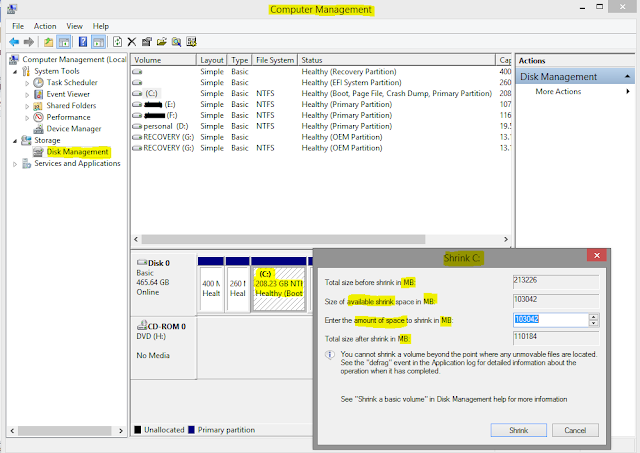
Abstract- Somehow, we need to create a new drive, for gathering ours personal components like as software, picture, documents. Besides, when we buy a computer, it contains may be 2 or 3 drive (with 500GB/1TB Hard-disk). But we need minimum 5 to 6 drives (approximately). For those reasons, we have to make new partition/new volume. Now I am going to show you that how to make new partition/new volume .it’s easy & simple to do. Let's make it simple. Follow me- N.B- Focus on highlighted color :-( Yellow ) ( Red ) Type (windows key +R), it shows a box (RUN). Type - compmgmt.msc on this (RUN) box. after typing, hit enter. It shows a box like below of this content. Through this box, we can know about all of things (specifications) whatever we have to need. From the left side, we will chose -Disk management. It will show all of existing volume. Now, we will select this existing Drive where has vast amount of space (200GB or more). Selecting this existing drive, we can go to-shrin...

How to check PC components full specifications - How do I find easily

Image
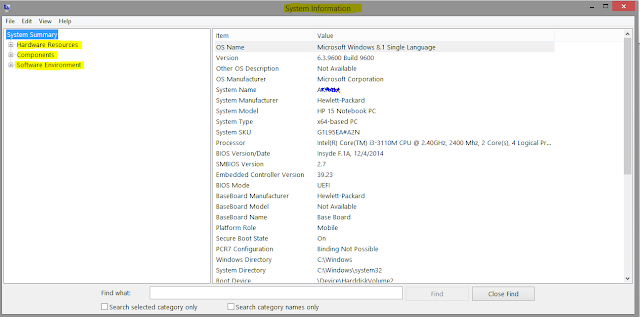
Abstract - Sometimes, we need to know about ours PC components specifications, it can be hardware components or software components. What are my PC components specs? We always face this issue. For knowing about those PC components specs, we need to go device manager, properties, setting etc. That’s mean to check full specifications of computer need to do various clicks on various folder. Besides, someone takes help another 3rd party software for knowing about his/her PC components specifications. For being those hassle, I recommend to do this step to know full specifications (hardware & software). Its easy & time consuming method. How do you do it? Check below.  Do those steps, its pretty simple. N.B- Please attention on highlighted color:- ( Yellow ) ( Red ) > Press ( windows/super key + R ), it shows a box (Run). Type - msinfo32 on this (Run) box. After typing, hit  enter . It shows a box like below. On this box, you can know about all of things (s...

Check and Uncheck all checkboxes with jQuery

Checkbox Plays a key role in forms. We always try to find some shortcut way. The check and uncheck all functionality basically a shortcut where the large list of records are available and all of them need to select through one click. By this functionality user can easily do work. "I am literally confused how to check and uncheck all checkboxes with jQuery." you inner mind is speaking like that maybe. But, now I am here to help you how to do it with jQuery. I will show you, how to check all parent checkboxes with button and without button. Here is the HTML: <!-- jQuery: https://cdnjs.cloudflare.com/ajax/libs/jquery-compat/3.0.0-alpha1/jquery.min.js --> <!-- Bootstrap 4.1v --> <div class="container my-3"> <h2>Example1 - Check and Uncheck All With Single Button</h2> <input type="button" class="box btn btn-default mb-3" id="box" value="check all" /> <div> <input type="c...

How to speed up your computer

Image
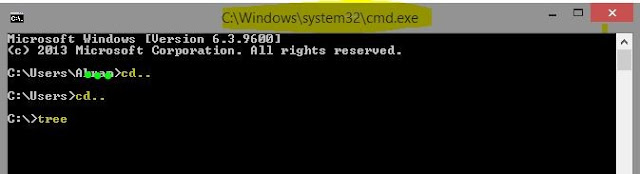
Abstract- We always want ours computer should run fast. But it is a matter of sorrow that sometimes it faces some obstacles like as slow to do any task, slow windows start up, lunch any application etc. for being this hassle, we may not feel comfort to use our computer .Now I am going to show you some features to run fast a computer without using any third party software. Now do those steps, its simple N.B- please attention on highlighted color :-( Yellow ) ( Red )  Type ( windows key + R ) ,it shows a box (RUN) . . Type- cmd on this (run) box. after typing hit enter . It shows a box like below. Then do this- cd.. < hit–Enter button > cd.. < hit–Enter button > tree < hit–Enter button >. It will take time.          At last type- Exit .  Press ( windows key +R ), it shows a box (RUN). Type- services.msc on this (RUN) box. After typing, hit enter . It shows a box like below. From there you can stop any of your apps which run ...

The best example of the difference between JavaScript and jQuery

Image
Most common and popular question is, What exactly is JavaScript? What exactly is jQuery? What are the difference? How would we know which one is JS and which one is jQuery? Actually, when I started learning web development. I was too confused and how to determine which one is JavaScript and which one is jQuery language. In this article, you will have example of JavaScript language and jQuery language. And you will also gather knowledge about the difference between JavaScript and jQuery. Some of people said that, they look like competitors. But in real, they aren't. So what's the difference between JavaScript and jQuery? JavaScipt is a programming language, while jQuery is a library. Without JavaScript, jQuery is nothing. Because JavaScript was born first then jQuery built. JavaScript can live by itself, while jQuery doesn't. JavaScript created in the mid-90s, by Brendan Eich . JavaScript becomes popular so fast, because of it's friendly behavior. It can run ...

How to hide a drive in windows without any software

Image
Abstract- We know that somehow third party tools or software are hassle for us & also non-trustful. But we badly need to hide our drive. In this circumstances, we can do ourselves without installing any software or third party tools. Now, I am going to show you. How to hide a drive without using any software? Now do those steps, if you want to see How to hide a drive without any software? . N.B- Please attention on highlighted color :-( Yellow ) ( Red ) & DRIVE letter. And type commands without quotation. Type ( windows key +R ), it shows a box (RUN)  Type - 'cmd'  on this (run) box After click OK button, it shows a another box & type on there 'diskpart'  & hit Enter button. It will show you another box, on there type 'list volume' & hit Enter . After that, drive list will be shown. Now, its your choice which drive you want to hide. I have hide DRIVE D . Type 'select volume D' & hit enter .  The Drive D has selec...

How to detect proxy IP or real IP

Image
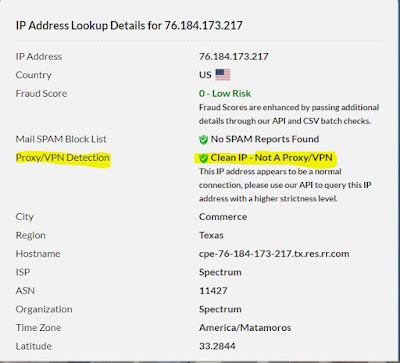
A proxy is called formally an application proxy, or here an HTTP proxy: they only handle the traffic generated by some applications. Motivation of this content, detecting proxy IP which is given by ISP provider somehow. For this reason, we may not access some sites which have forbidden proxy IP. So, we can be checked our IP is that proxy or not. Can be checked through this - N.B- Please attention on highlighted color :- ( Yellow ) ( Red ) Go to IP checker  site   There will show your IP Click on your IP It shows like those picture Through this checking, we can detect our IP problems & geo-location of IP address. There are several ways: Proxy headers, such as  X-Forwarded-For  and X-Client-IP, can be added by non-transparent proxies. Active proxy checking can be used - the target server attempts to connect to the client IP on common proxy ports (e.g. 8080) and flags it as a proxy if it finds such a service running. Servers can check if the request ...

Best way to get the current page url in php

In every website you will have unique address. When you are doing a project sometime we need to access that website for link up my Stylesheet, HTML5, Javascript, PHP etc files. And sometimes you need to dynamically generate the title of a page based on its URL. What will you do? If that page have the HTTP or HTTPS what will happen. How to get HTTP or HTTPS and the base link of website using PHP? Here, you will see the path of code. But you need to give more effort for its security & for more easy way to make that functions. I am not going to tell you because of, A greatest person told that, A teacher can only show the path & maybe give him/her tips of obstacle but you need to decide what to do? and how to do? face with that obstacle. If you want to get current url path what will you do: Here's the code...  PHP: $currentUrl = $_SERVER[SCRIPT_URI]; echo $currentUrl; Get the domain name only with HTTP or HTTPS. PHP: public function url() { $p...

How to secure your website php

Writing a PHP application is very easy. But sometimes they do simple mistake which is very detrimental for application. If you made an application, How users can trust on your application?  In this article, I am going to give you some basic security tips to help you protect your users trust in your application. User likes secure site. Protect your servers Protect your network Protect your application Protect against request forgeries Protect against Cross-Site-Scripting 1. Protect your servers:  The important part of protecting server is Firewall. After establishing your server, must need to set up Firewall.  Keep your web server software up-to-date Use SSH for secure connection & copy your file remotely. SSH will help you to make sure all information goes out and in of the system remains private & protected from third party users(Hacker). Keep your server location secret.  Hackers can know lots of thing by your system servers IP...