Posts

How to speed up your computer
Image
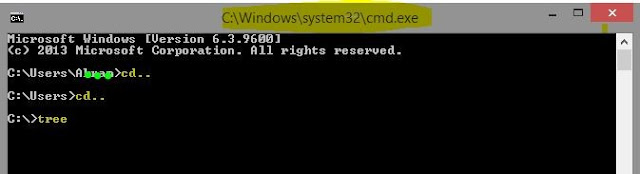
Abstract- We always want ours computer should run fast. But it is a matter of sorrow that sometimes it faces some obstacles like as slow to do any task, slow windows start up, lunch any application etc. for being this hassle, we may not feel comfort to use our computer .Now I am going to show you some features to run fast a computer without using any third party software. Now do those steps, its simple N.B- please attention on highlighted color :-( Yellow ) ( Red )  Type ( windows key + R ) ,it shows a box (RUN) . . Type- cmd on this (run) box. after typing hit enter . It shows a box like below. Then do this- cd.. < hit–Enter button > cd.. < hit–Enter button > tree < hit–Enter button >. It will take time.          At last type- Exit .  Press ( windows key +R ), it shows a box (RUN). Type- services.msc on this (RUN) box. After typing, hit enter . It shows a box like below. From there you can stop any of your apps which run ...

The best example of the difference between JavaScript and jQuery

Image
Most common and popular question is, What exactly is JavaScript? What exactly is jQuery? What are the difference? How would we know which one is JS and which one is jQuery? Actually, when I started learning web development. I was too confused and how to determine which one is JavaScript and which one is jQuery language. In this article, you will have example of JavaScript language and jQuery language. And you will also gather knowledge about the difference between JavaScript and jQuery. Some of people said that, they look like competitors. But in real, they aren't. So what's the difference between JavaScript and jQuery? JavaScipt is a programming language, while jQuery is a library. Without JavaScript, jQuery is nothing. Because JavaScript was born first then jQuery built. JavaScript can live by itself, while jQuery doesn't. JavaScript created in the mid-90s, by Brendan Eich . JavaScript becomes popular so fast, because of it's friendly behavior. It can run ...

How to hide a drive in windows without any software

Image
Abstract- We know that somehow third party tools or software are hassle for us & also non-trustful. But we badly need to hide our drive. In this circumstances, we can do ourselves without installing any software or third party tools. Now, I am going to show you. How to hide a drive without using any software? Now do those steps, if you want to see How to hide a drive without any software? . N.B- Please attention on highlighted color :-( Yellow ) ( Red ) & DRIVE letter. And type commands without quotation. Type ( windows key +R ), it shows a box (RUN)  Type - 'cmd'  on this (run) box After click OK button, it shows a another box & type on there 'diskpart'  & hit Enter button. It will show you another box, on there type 'list volume' & hit Enter . After that, drive list will be shown. Now, its your choice which drive you want to hide. I have hide DRIVE D . Type 'select volume D' & hit enter .  The Drive D has selec...

How to detect proxy IP or real IP

Image
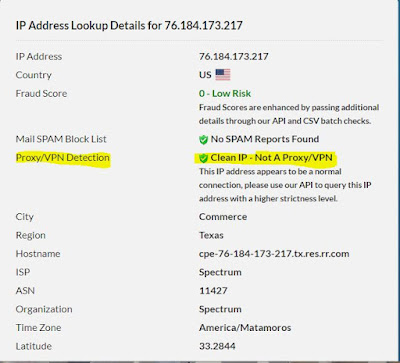
A proxy is called formally an application proxy, or here an HTTP proxy: they only handle the traffic generated by some applications. Motivation of this content, detecting proxy IP which is given by ISP provider somehow. For this reason, we may not access some sites which have forbidden proxy IP. So, we can be checked our IP is that proxy or not. Can be checked through this - N.B- Please attention on highlighted color :- ( Yellow ) ( Red ) Go to IP checker  site   There will show your IP Click on your IP It shows like those picture Through this checking, we can detect our IP problems & geo-location of IP address. There are several ways: Proxy headers, such as  X-Forwarded-For  and X-Client-IP, can be added by non-transparent proxies. Active proxy checking can be used - the target server attempts to connect to the client IP on common proxy ports (e.g. 8080) and flags it as a proxy if it finds such a service running. Servers can check if the request ...

Best way to get the current page url in php

In every website you will have unique address. When you are doing a project sometime we need to access that website for link up my Stylesheet, HTML5, Javascript, PHP etc files. And sometimes you need to dynamically generate the title of a page based on its URL. What will you do? If that page have the HTTP or HTTPS what will happen. How to get HTTP or HTTPS and the base link of website using PHP? Here, you will see the path of code. But you need to give more effort for its security & for more easy way to make that functions. I am not going to tell you because of, A greatest person told that, A teacher can only show the path & maybe give him/her tips of obstacle but you need to decide what to do? and how to do? face with that obstacle. If you want to get current url path what will you do: Here's the code...  PHP: $currentUrl = $_SERVER[SCRIPT_URI]; echo $currentUrl; Get the domain name only with HTTP or HTTPS. PHP: public function url() { $p...

How to secure your website php

Writing a PHP application is very easy. But sometimes they do simple mistake which is very detrimental for application. If you made an application, How users can trust on your application?  In this article, I am going to give you some basic security tips to help you protect your users trust in your application. User likes secure site. Protect your servers Protect your network Protect your application Protect against request forgeries Protect against Cross-Site-Scripting 1. Protect your servers:  The important part of protecting server is Firewall. After establishing your server, must need to set up Firewall.  Keep your web server software up-to-date Use SSH for secure connection & copy your file remotely. SSH will help you to make sure all information goes out and in of the system remains private & protected from third party users(Hacker). Keep your server location secret.  Hackers can know lots of thing by your system servers IP...

How to lock a folder without any third party software

Image
Purpose - we always want to hide something in our computer for being safety purposes or for being guest users. In this situation, we need to hide or lock. For this reason, we may be used some third party software. But now, I am going to show you How to lock folder in PC? or How to hide folder in PC? without using any software or apps. In a word, a folder will be locked or hide with CMD (Command Promote) Now do those steps, its simple. N.B- Please attention on highlighted color :-( Yellow ) ( RED ) Go to any drive where you want to hide.  Create a (New Text Document.txt ) Open it up Paste that code (You can copy the code from end of the article.) On previous picture, highlighted yellow color ( XXXX ), you need to set password whatever you want (Example- 2456). After that you need to go save as option on your (New Text Document.txt). Save it as Locker.bat (highlighted with yellow). Then, you will see you text doc. will be converted into anothe...